Journal / Note
On Roku, a corner radius used to be a file
How 9-patch images shaped Roku app design, and what the Effect node in Roku OS 16.0 changes for rounded corners, borders, gradients, and focus.
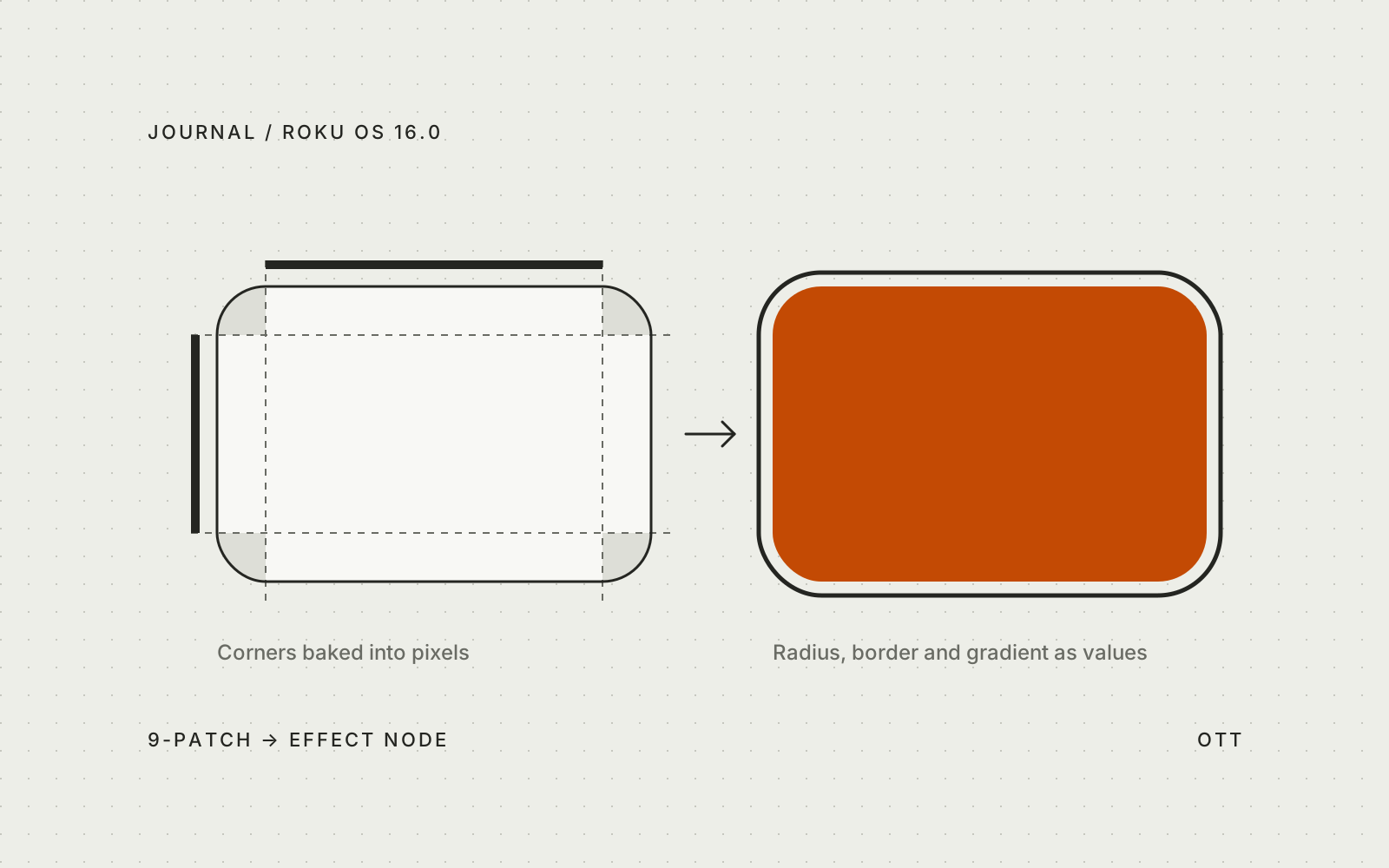
I work on OTT apps, and one of the first things you notice on Roku is that a rounded corner is actually a picture. Roku apps are built with SceneGraph, not HTML. There’s no CSS, no border-radius, and a Rectangle node is just a flat block of one color. Anything with a curve, an outline, or a gradient has to be a bitmap — in most cases, a 9-patch image.
This one technical detail shapes how TV apps on the platform look. Roku OS 16.0, which is now in developer beta, adds the Effect node: rounded corners, borders, and gradients drawn by the GPU. To understand what it changes for design, it makes sense to start with the 9-patch.
How 9-Patch Images Work on Roku
A 9-patch is a regular PNG with an extra one-pixel border of markers — the same format Android uses for NinePatch graphics. Lines on the top and left edges define which parts of the image can stretch. Lines on the right and bottom define the content area. The image is split into nine pieces: the four corners keep their size, the edges stretch in one direction, and the center stretches in both.
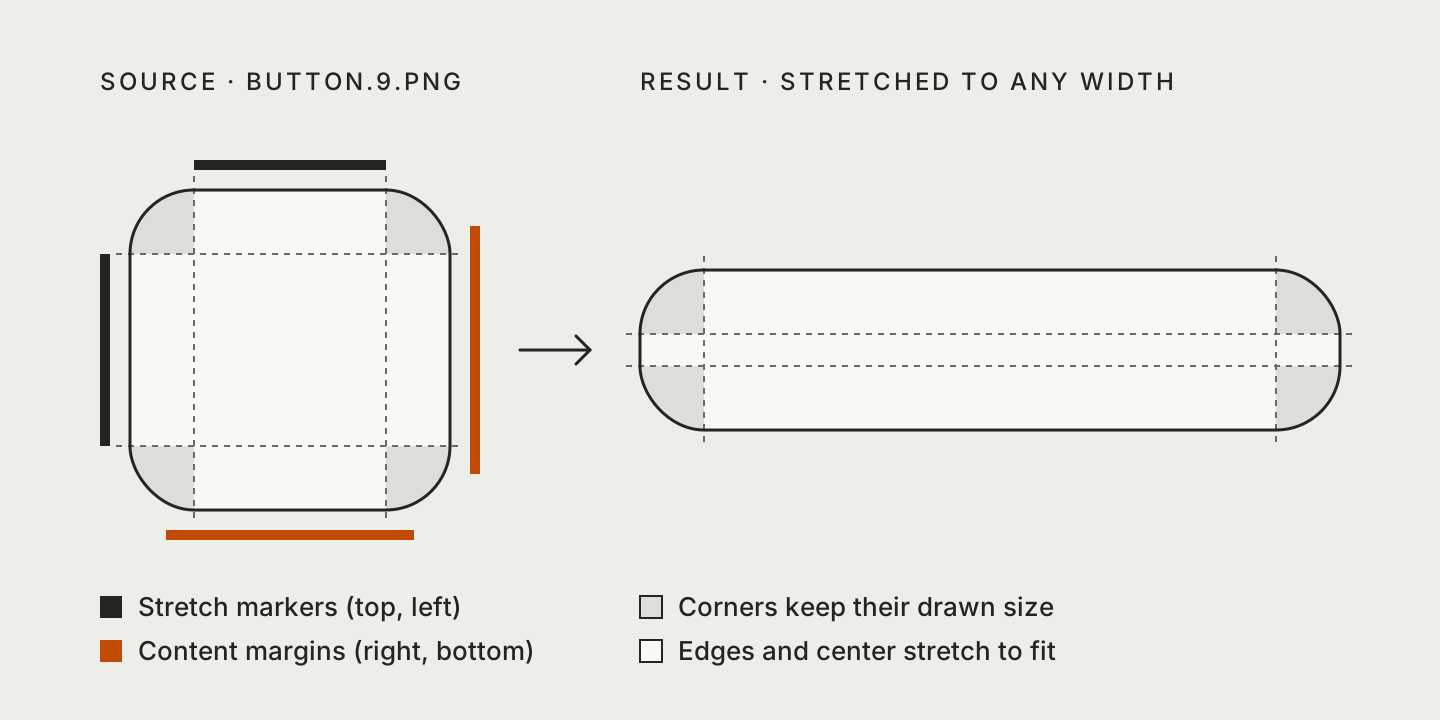
It’s a practical tool. One small file can become a button, a card background, or a frame of any size. Roku’s own components rely on it a lot: the SceneGraph schema recommends 9-patch images for list focus indicators, section dividers, dialog backgrounds, and keyboard focus, and the default focus frames in lists and grids are 9-patch PNGs as well.
What 9-Patch Did to TV Design
The format works. The problem is what it does to a design — and that shows up in places that have nothing to do with code.
A Radius Is a File, Not a Value
In Figma, a corner radius is a number you can change in a second. On Roku, it’s baked into pixels. Every combination of radius, border width, and state becomes a separate asset: a card with 12 px corners, the same card with a focus ring, the same pair for a pill-shaped button, and so on.
So a design token like radius-md doesn’t map to code. It maps to a list of files. Changing it means redrawing and re-exporting assets, not editing one line.
Color helps a bit. The Poster node has a blendColor field that tints an image by multiplying each pixel, so assets can be drawn in white and tinted in code. But multiplication gives you one color per image. A fill in one color with an outline in another, or a gradient, still needs its own file.
Artwork Stays Square
A 9-patch can shape a background or a frame, but it can’t cut the corners off the poster inside it. That leaves three options, and none of them is free:
- Round the artwork on the server. It works, but a visual decision turns into a backend task, and every radius change means reprocessing images.
- Hide the corners with an overlay. A 9-patch frame with a transparent center and corners painted in the background color fakes the rounding. It only works on a flat background with a known color.
- Use MaskGroup. It applies an alpha mask to its children, but it only works on players that support OpenGL, it doesn’t accept 9-patch masks, and Roku recommends using it only for decorative purposes.
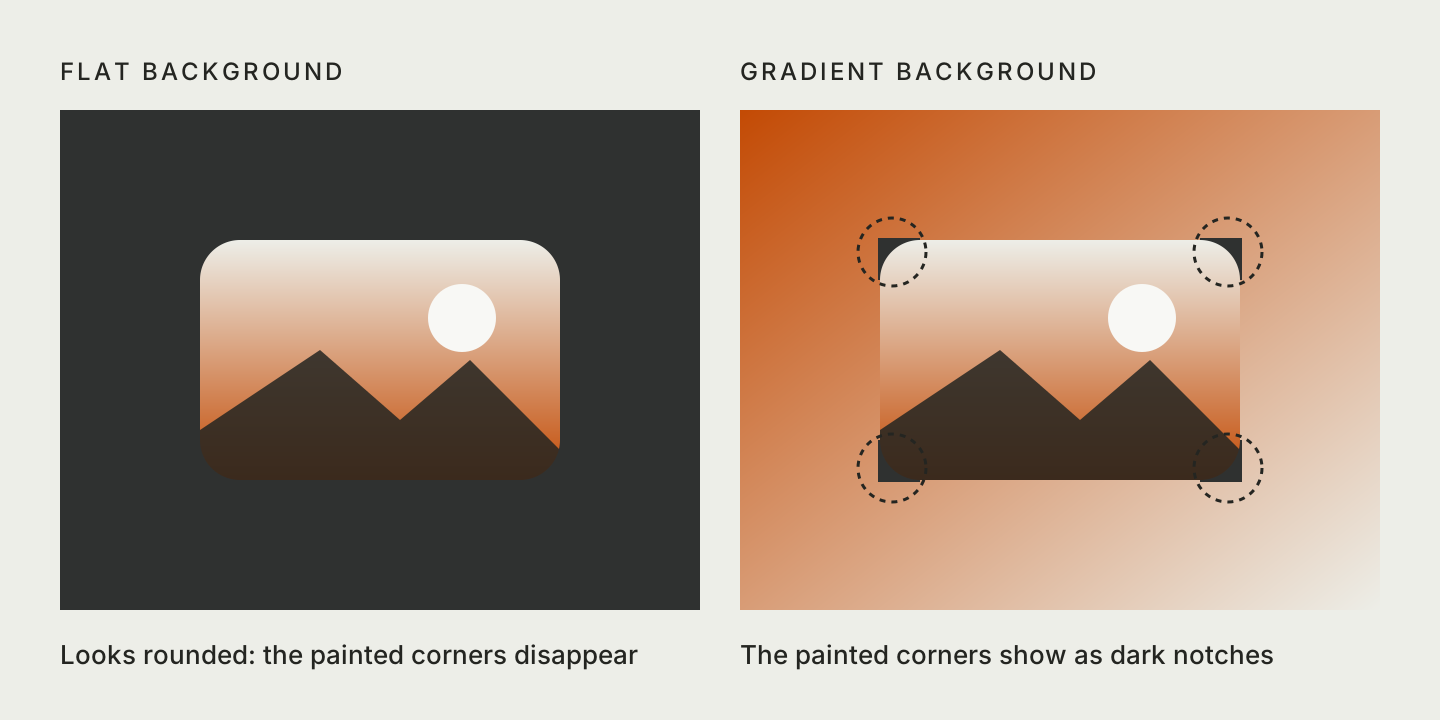
As a result, there’s a rule nobody writes down: anything behind rounded artwork has to be flat. No hero video behind a row of rounded posters, no gradient behind cards. Or, more often, the artwork just stays square while the focus ring around it is rounded.
Focus Is a Stretched Picture
On a TV, focus is the cursor. It’s the one element the viewer follows with every press of the remote, so for me it’s the most important part of the interface. On Roku, the focus indicator in a list or grid is a single bitmap stretched over the focused item.
This has two consequences. First, the ring has to match the item’s shape manually: if the card radius changes, the focus asset has to change too. Second, the shape can’t move. A 9-patch can grow and shrink, but its radius and stroke are fixed, so a card that softens its corners on focus needs a set of bitmaps and code to swap them.
Gradients Are Images Too
The dark gradient behind a title on a hero banner and the fade at the edge of a row are both PNGs layered over the content. It works, but it also means one more asset for every shape and direction.
All together, this pipeline shaped the visual language of the platform: few radii, flat backgrounds, square artwork, and focus rings drawn as images. Many of these choices come from the cost of each asset, not from anyone’s taste.
What the Effect Node Changes in Roku OS 16.0
The Effect node attaches to a Poster or a Rectangle through their new effect field. It holds a small set of parameters: borderRadius, borderWidth, borderColor, borderPadding, and a linear or radial gradient with two to eight colors that can fill the content, the border, or both. The GPU draws all of it at render time.
For design, this changes much more than the number of assets.
Radius Becomes a Value Again
borderRadius takes one value for all corners or four values for each corner. Border width and color are values too. This means tokens from a design file can map one-to-one to fields in code: change the token, and the interface follows without a new export.
Rounded Artwork on Any Background
The effect is applied to the Poster itself, so the image is actually shaped, not covered. Rounded posters over video, cards on a gradient, artwork that matches the radius of its frame — all without server-side processing or a flat background.
Focus That Follows the Shape
Roku OS 16.0 also exposes the Poster that grids like RowList and MarkupGrid use as their focus indicator, through the new focusFeedbackPoster field. Apply an Effect to it, and the indicator matches the item, even with asymmetric corners. borderPadding adds space between the content and the border, which gives you the offset focus ring that reads well from across the room.
Shapes Can Animate
A new FloatArrayFieldInterpolator node animates fields that hold arrays of numbers, such as borderRadius. Before, this required BrightScript callbacks. Now a card can change its corners on focus as part of the same animation as its scale.
Gradients Are No Longer Files
Scrims, fades, and gradient outlines become parameters of the node they belong to.
Design the Fallback First
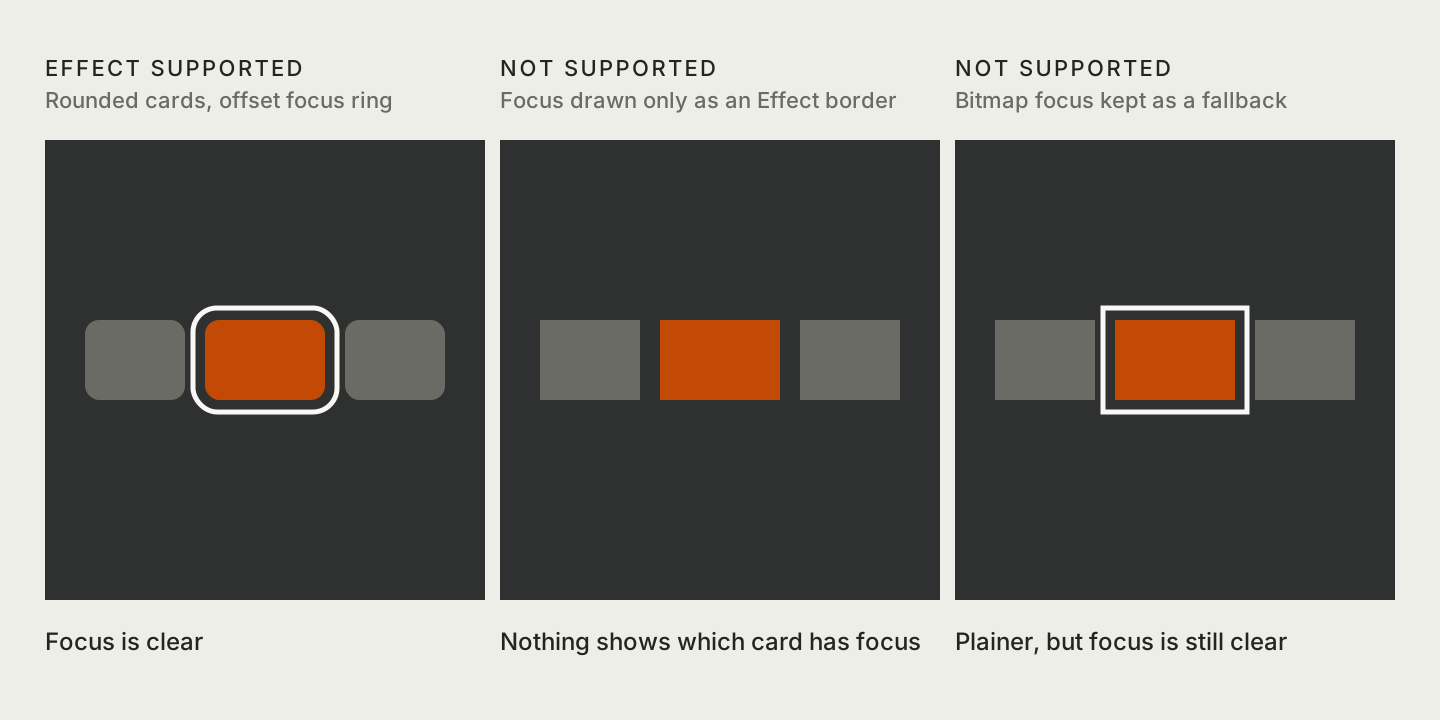
There’s one condition in Effect that matters more to designers than to developers. On devices without a shader-capable GPU, or where effects are disabled by configuration, the node does nothing — the Poster or Rectangle renders as if no effect was set. A read-only supported field tells the app which case it’s in, and the reference doesn’t list which devices fall into which group.
So the same app will run in two visual versions, and both need to be designed:
- Make the plain version acceptable. With square corners, no border, and no gradient, the screen should still be readable and look intentional.
- Never rely only on an Effect border for focus. If the focus ring exists only as a border on a transparent shape, a device without support shows nothing at all — and a TV interface without visible focus is broken. Keep a bitmap focus indicator as a fallback.
- Choose the fallback color on purpose. A Rectangle’s own color is what stays when the gradient is gone, and the text on top of it still has to be readable.
- Keep your 9-patch skills. Devices without support, and devices that haven’t received the update yet, still depend on them.
Watch the Corner Order in borderRadius
One more detail for handoff. CSS lists the four corners starting from the top left. Effect lists them clockwise, starting from the top right:
| Value | CSS border-radius |
Effect borderRadius |
|---|---|---|
| 1st | top left | top right |
| 2nd | top right | bottom right |
| 3rd | bottom right | bottom left |
| 4th | bottom left | top left |
A card with only the top corners rounded is 16px 16px 0 0 in CSS and [16, 0, 0, 16] on Roku. If you copy the CSS values, you get [16, 16, 0, 0] — and the right side is rounded instead of the top. That’s why I’d write specs with named corners, not as a list of numbers.
What Stays the Same
9-patch never limited what designers could imagine. It limited what was worth the cost. The Effect node moves corners, borders, and gradients from the asset pipeline back into the design system, where they belong.
What stays is the part TV design has always had: deciding what the screen still needs to do when the nicer version isn’t available.
Sources
- Effect node reference — Roku Developer
- Release notes: Roku OS 16.0 — Roku Developer
- Poster node reference — Roku Developer
- MaskGroup node reference — Roku Developer
- Lists and grids — Roku Developer
- SceneGraph XML schema — Roku Developer
- NinePatch drawables — Android Developers
- Here is everything new in the Roku OS 16 update — Cord Cutters News, October 15, 2026